
Viral Tech Wings
WNBA Finals tickets: verify the seller before you pay
How a lookalike ticket site can divert your money or personal details, and how to check the route to a seller independently.
The WNBA Finals provide a timely reason to talk about buying tickets online. The league’s official site confirms the 2026 Finals. That sporting event is the context for this lesson, not evidence that the WNBA or its ticket systems have been attacked. [1]
Our question is practical: before you type personal details or pay for a ticket, how do you know which seller receives them?
The attack: a familiar appearance, a different destination
Website spoofing means presenting a site as if it belonged to a trusted organisation. A copied logo and plausible listing can hide the fact that another operator controls the page. In May 2026, the FBI documented spoofed FIFA sites used to collect personal information and offer fake World Cup tickets. That report establishes a real ticket-fraud mechanism; it does not establish a campaign against another league or event. [2]
When a deceptive message or advertisement draws someone to such a page to obtain information, it can form part of phishing, a deception intended to induce disclosure or another harmful action. The weakness in our example is a failed identity check: treating the familiar design as proof of the seller’s identity. It is not a claimed software vulnerability or a CVE.
The protected assets are the buyer’s money and personal information. The important boundary lies between a page the buyer recognises visually and an operator they have actually verified. A site can look convincing without belonging to the expected company.
A fictional example: two routes to a ticket
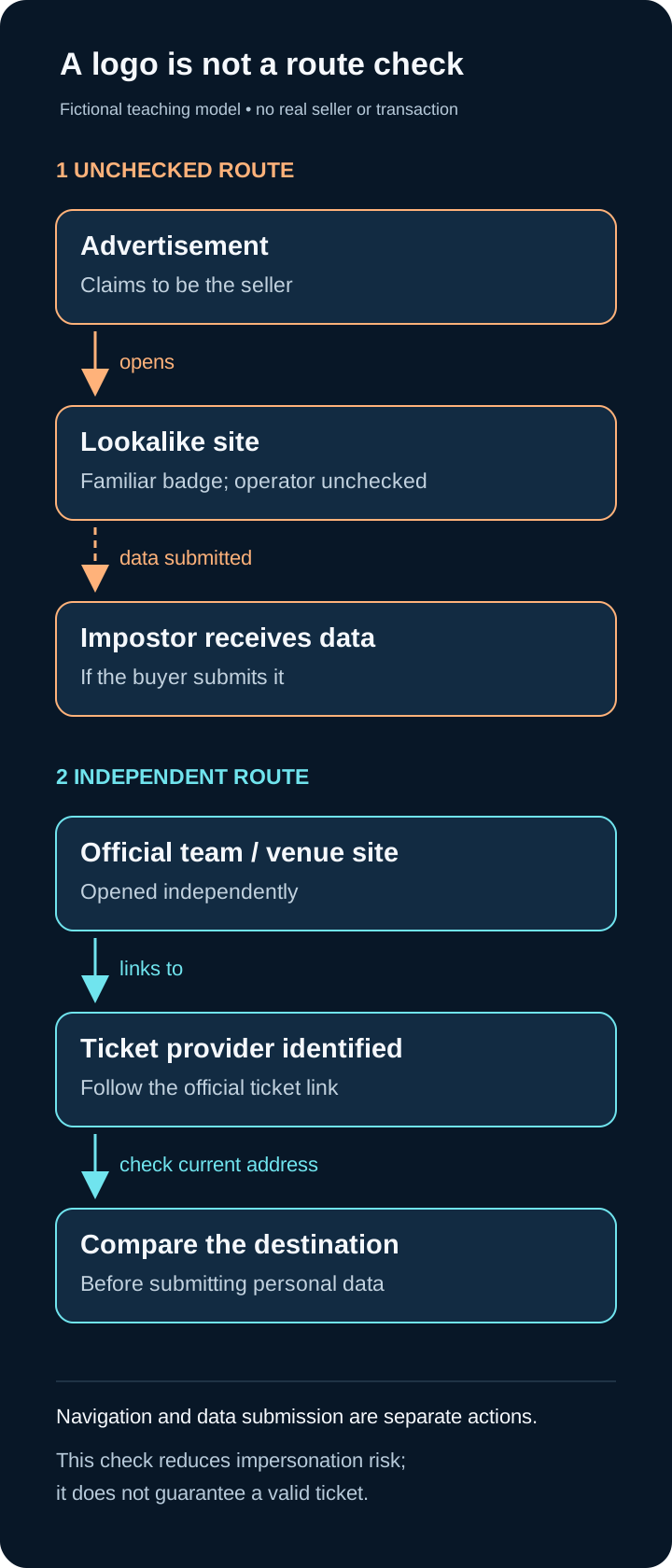
Figure 1. Original CTW teaching model. Separate arrows show navigation and the later submission of data. This is not a capture of a real seller, transaction or attack.
Imagine a fan sees a tempting ticket offer. These are two possible paths, not two actual websites:
| Stage | Unchecked path | Independent check |
|---|---|---|
| Starting point | An advertisement claims to represent a ticket seller. | The fan opens the team’s official site independently. |
| Navigation | The offer opens a page with a familiar-looking badge. | The fan follows the team’s ticket link and notes the provider it identifies. |
| Decision | The badge is accepted as proof, so the fan enters data. | The fan compares the current seller address with the expected provider before submitting data. |
The loss in the fictional path depends on an impostor controlling the destination and the buyer submitting data or payment. Merely seeing an advertisement does not mean a device or account has been compromised. The buyer may lose money, disclose information, or both; these are possible consequences, not findings about a particular fan.
A check you can actually perform
- Start independently. Open the team’s or venue’s official website using an address you have independently established, rather than a seller’s unsolicited message.
- Follow its ticket route. A legitimate team may use a separate ticket provider. A different domain is a reason to check the relationship, not proof of fraud.
- Inspect the current address before entering data. Expand the address bar and compare the site name with the provider identified through the official route. Recheck after a redirect. Do not rely only on page design or words elsewhere in the address.
- Resolve uncertainty outside the offer. If the relationship is unclear, stop and contact the venue or provider through the independently opened official site. Do not ask the suspicious page to certify itself.
The observable result is a traceable route: official team or venue → identified ticket provider → matching destination. This is stronger evidence than a copied logo. It reduces this particular impersonation risk; it does not guarantee that every listing, resale transaction or ticket is valid.
What HTTPS does—and does not—tell you
A secure connection protects information between the browser and the site it has reached. Google also advises checking the site name before sharing sensitive information. Connection security and seller identity are different checks. A secure connection to the wrong operator does not make that operator the intended seller. [3]
For practice, draw the two routes on paper. If you label them with sample domains, use reserved names such as team.example and seller.example, rather than potentially real addresses. The .example ending is reserved for documentation. Do not submit data or try buying a ticket to test whether a suspicious site is fraudulent. [4]
One habit to retain: establish the seller through an independent route before you trust the payment page.
References
-
WOMEN’S NATIONAL BASKETBALL ASSOCIATION. Official Home of the WNBA. 2026 Finals coverage. https://www.wnba.com/ . Accessed 18 October 2026. ↩
-
FEDERAL BUREAU OF INVESTIGATION, INTERNET CRIME COMPLAINT CENTER. Threat Actors Spoofing FIFA Websites in Advance of the 2026 World Cup. Alert I-052726-PSA, 27 May 2026, sections “How the Scam Works” and “Tips to Protect Yourself”. https://www.ic3.gov/PSA/2026/PSA260527 . Accessed 18 October 2026. ↩
-
GOOGLE. Check if a site’s connection is secure. Chrome Help, sections “Check site information” and “What each security symbol means”. https://support.google.com/chrome/answer/95617?hl=en . Accessed 18 October 2026. ↩
-
EASTLAKE, D.; PANITZ, A. Reserved Top Level DNS Names. RFC 2606, BCP 32, June 1999, section 2. https://www.rfc-editor.org/rfc/rfc2606.html . Accessed 18 October 2026. ↩