
Device guide
ESP32 Marauder: turning Wi-Fi announcements into a useful inventory
Understand boards, firmware, SSID, BSSID, channel and RSSI; compare a laboratory access point with expected records and learn to investigate differences.
From a network list to the right question
A Wi-Fi list can contain familiar names, unfamiliar names and several similar entries. To turn it into useful information, we need an expected inventory and a verifiable question: does my access point’s announcement appear as expected under this experiment’s conditions?
ESP32 Marauder is a firmware project for different boards. Before following the exercise, identify the board you will use: the board, version and accessories of the unit presented here have not yet been documented. Documentation distinguishes variants with different processors, interfaces and radios. Some current versions use ESP32-C5 and offer two bands; that does not establish coverage for a device described only as “ESP32 Marauder”. Check the board and firmware combination before interpreting an absence from the list.[1]
We will observe announcements from an owned or formally authorized AP and compare them with what you expect to find. AP, or access point, is the device offering access to the wireless network. The exercise does not require connecting clients or changing network traffic.
What Scan APs observes
An AP announces its network through management frames called beacons. Scan APs documentation describes recognizing these frames, displaying MAC and ESSID, and maintaining a list by BSSID. The documented path is WiFi → Sniffers → Scan APs; verify how it maps to the installed firmware.[2]
This observes received announcements. It does not list every connected computer, phone and object, or inspect their files. A wired machine, for example, does not become an AP entry simply because it belongs to the same network.
Four fields that deserve their own names
The Espressif Wi-Fi driver’s AP records distinguish SSID, BSSID, primary channel and RSSI. That structure explains the concepts; it does not guarantee that your Marauder screen displays every field.[3]
| Field | How to use it in analysis |
|---|---|
| SSID | Network name presented to users; compare expected spelling |
| BSSID | MAC address associated with the observed BSS; compare administrative records |
| Channel | Frequency region in use; also record the band |
| RSSI | Received signal-strength indicator; compare similar conditions |
SSID is not an exclusive identity. A repeated name needs the inventory for interpretation. One physical box also need not correspond to one entry: devices supporting multiple BSSIDs can present several virtual networks. Cisco documents this capability on supported APs; it is not a Marauder board specification.[4]
RSSI is not a distance ruler either. In the documented API it is expressed in dBm; −45 dBm represents a higher level than −70 dBm. Record the value as an observation at that receiver and position, without converting it directly into meters.[3]
Board, firmware and interface belong in the result
Before the exercise, note the complete board identification, firmware-reported version, antenna and operating interface: integrated screen, serial interface or companion device. The official compatibility table maps hardware to firmware binaries. Sharing the ESP32 family name does not make firmware files interchangeable.[1]
If your interface shows only MAC and ESSID, the laboratory exercise remains valid. Mark channel and RSSI as not displayed instead of copying them from a tutorial or AP configuration and presenting them as measurements. “Configured”, “announced” and “observed” belong in separate columns.
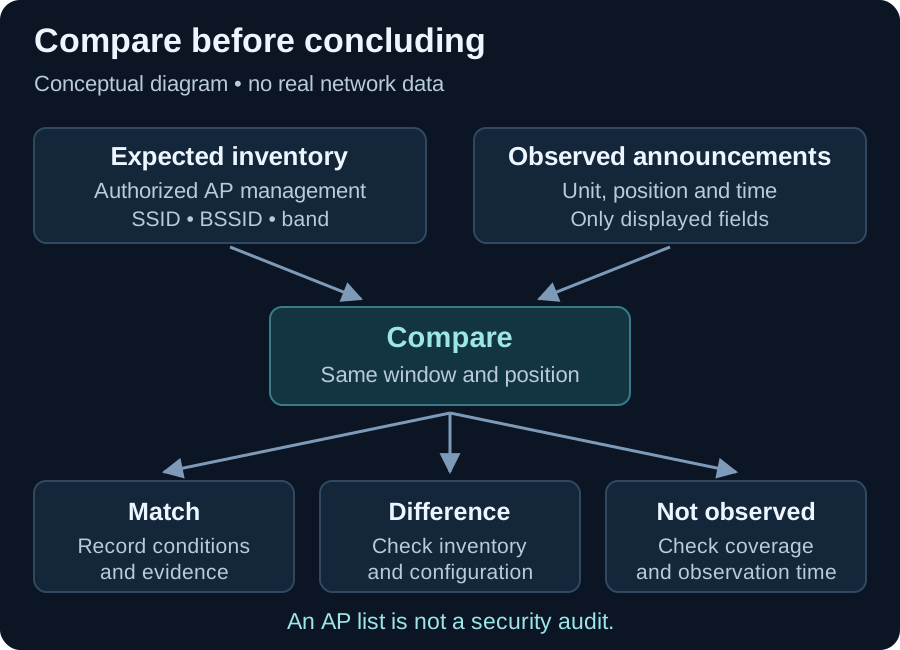
Use the conceptual diagram to follow the comparison. It is not an interface capture, a unit measurement or a map of a real network.
Laboratory: a known AP, one change at a time
Objective: build a repeatable comparison between administrative configuration and an observed announcement. Use a dedicated laboratory AP, access to its management interface and the identified Marauder unit. Choose a permitted band and channel supported by both devices. The AP can remain disconnected from the internet; its local announcement is the subject of study.
-
Record the expectation. In the AP’s management interface, note SSID, band, configured channel and radio/WLAN BSSID when available. The MAC printed on the case may identify another interface; prefer radio-specific information. If the interface does not supply a BSSID, record that limitation.
-
Define the setup. Name the experiment, for example
CTW-LAB-A. Mark a fixed observer position, record unit orientation and choose an observation window such as 60 seconds. That duration organizes the comparison and does not guarantee complete coverage. -
Prepare a minimal record. The Scan APs page says beacons can be saved to PCAP when an SD card is attached. For this exercise, prefer manually recording your AP’s data and disable recording when the version allows it, or operate without a card. Do not publish captures containing third-party identifiers.[2]
-
Start a fresh list. Preserve previous work and clear only the experiment’s temporary list using the option documented for your version. The project explains that subsequent scans can append entries to the existing list; an old entry does not demonstrate current presence.[5]
-
Observe the powered AP. Start Scan APs through the available path and wait for the chosen window. Record the expected BSSID’s presence, SSID and only fields actually displayed. Note the time and observation point.
-
Compare with the AP off. Switch off only the dedicated AP, start a fresh list and repeat the same window. A difference between these conditions helps relate an entry to the reference. If the name remains, check BSSID and list state before concluding that another device exists.
-
Switch it back on and repeat. Return to the same position and check for the announcement’s return. Complete three cycles. If the AP automatically selects another channel after restarting, record the change; it becomes an experimental variable.
-
Test a controlled change. Optionally change only the laboratory AP’s SSID and repeat observation. Check whether its BSSID stayed the same or changed. The aim is to document the reference’s behavior without presuming the outcome.
A record that separates fact from hypothesis
ILLUSTRATIVE table, using fictional names and BSSIDs with no real measurements. Band and channel form a 2.4 GHz example, not a statement of unit support. RSSI must only be recorded as observed if the interface actually provides it.
| Fictional condition | Observed SSID | Fictional BSSID | Illustrative channel / RSSI | Interpretation |
|---|---|---|---|---|
| AP on | CTW-LAB-A | 02:00:00:00:00:01 | 6 / −45 dBm | Entry corresponds to the reference |
| AP off, fresh list | Not observed | Not observed | Unavailable | Reference not seen during this window |
| AP on again | CTW-LAB-A | 02:00:00:00:00:01 | 6 / −47 dBm | Entry returned; level varied |
| SSID changed in management | CTW-LAB-B | 02:00:00:00:00:01 | 6 / −46 dBm | In this example, name changed and BSSID remained |
The return after switching on makes the comparison more informative than a single absence. However, the experiment does not establish cryptographic authenticity of the announcement or network security. It tests correspondence between an expected record and repeated observations.
Investigating differences
Expected AP absent: check supported band, channel configuration, position, observation time and reference operation. Record “not observed” without immediately concluding that the AP is off.
Known name with another entry: check virtual networks and the administrative inventory. Do not assign ownership or intent from SSID. More entries than physical boxes: check multiple BSSIDs before counting equipment. Entry persists after switch-off: check list accumulation and repeat with fresh state.[4][5]
WLAN security also depends on component configuration, authentication, maintenance and monitoring. An inventory contributes to that work rather than completing it. NIST SP 800-153 addresses the lifecycle; this exercise does not assess all its controls.[6]
Practical deliverable
Keep a record containing expectation, observation, differences and the next verification. Include board, firmware, covered band, location, time window and unavailable fields so you can repeat the comparison under the same conditions. Remove third-party identifiers from any shared material.
To study what a guest network actually separates, continue with the network boundaries article. To distinguish Wi-Fi announcements from energy observed in a spectrum, compare with the tinySA Ultra guide.
References
-
JustCallMeKoko. Supported Hardware and Firmware Targets. ESP32 Marauder Wiki, 2026. Compatibility between boards, interfaces and binaries. Source. Accessed 17 October 2026. ↩ ↩2
-
JustCallMeKoko. Scan APs. ESP32 Marauder Wiki. Beacons, displayed fields, navigation and SD recording. Source. Accessed 17 October 2026. ↩ ↩2
-
Espressif Systems. ESP-IDF Programming Guide: Wi-Fi. Stable v6.1 documentation, ESP32.
wifi_ap_record_t: SSID, BSSID, channel and RSSI. Source. Accessed 17 October 2026. ↩ ↩2 -
Cisco. Configuring Multiple Basic Service Set Identifiers and Microsoft WPS IE SSIDL. Wireless LAN Configuration Guide, IOS XE Fuji 16.7.x. Multiple BSSIDs on one AP. Source. Accessed 17 October 2026. ↩ ↩2
-
JustCallMeKoko. Select APs. ESP32 Marauder Wiki. List viewing and accumulation; reference to Clear APs. Source. Accessed 17 October 2026. ↩ ↩2
-
NIST. Guidelines for Securing Wireless Local Area Networks (WLANs). SP 800-153, 2012. Component security throughout the lifecycle. Source. Accessed 17 October 2026. ↩